Project Overview
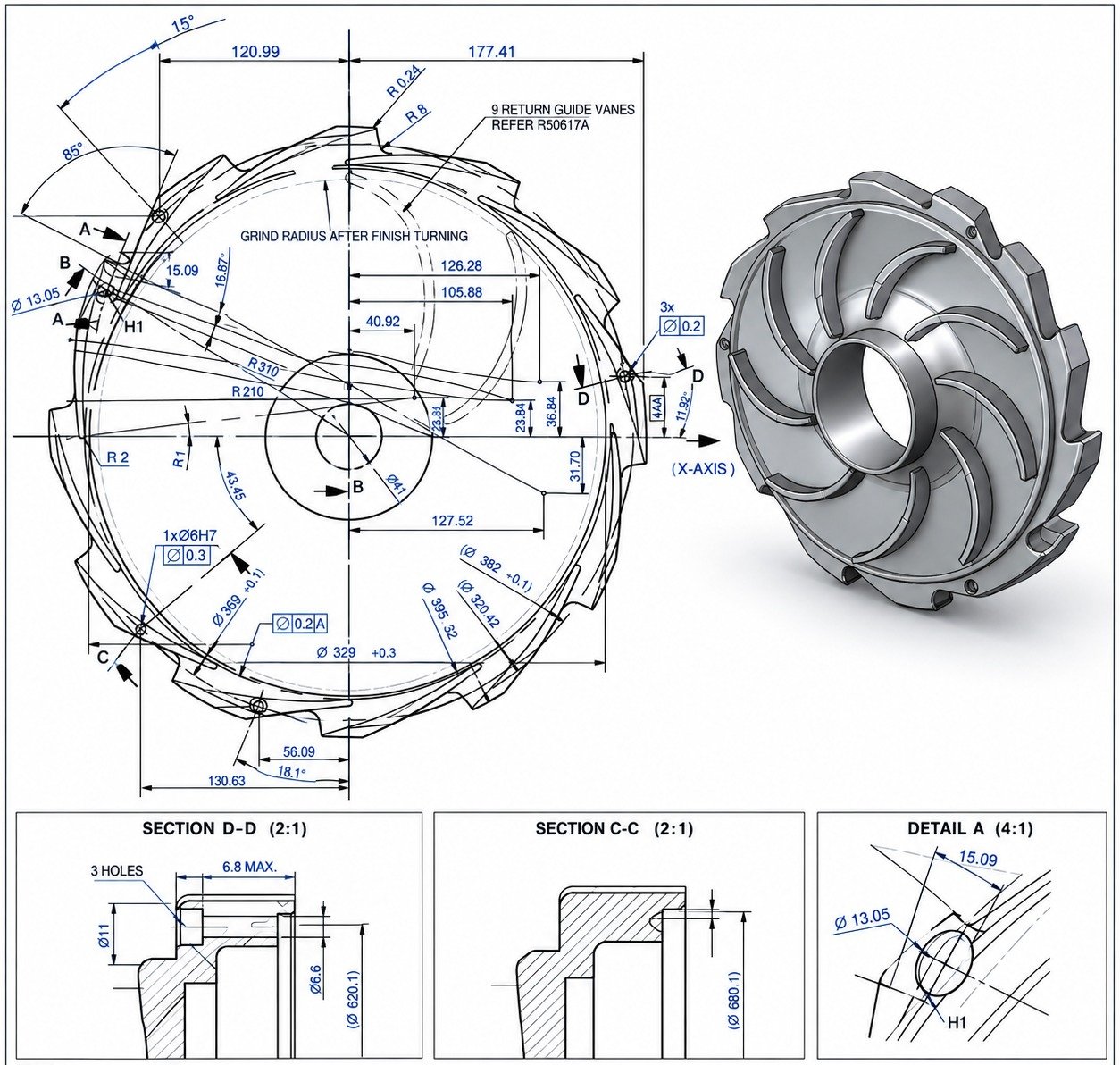
Many manufacturers still have valuable design information stored in 2D drawings, PDFs, or older paper-based documentation. These drawings may contain everything needed to manufacture a component, but they can become difficult to modify, reuse, or integrate into a modern 3D design workflow.
Solidus 3D Modeling worked on a project where the client needed to convert existing 2D engineering drawings into accurate, editable 3D CAD models.
The objective was straightforward: take the information already available in the drawings and turn it into usable 3D CAD data without losing the engineering intent behind the original design.
The resulting models could then be used for design revisions, visualization, manufacturing support, and future product development.
Building the 3D Model
The modeling process started with the primary geometry and reference dimensions from the drawings. From there, individual features were added progressively including holes, pockets, steps, fillets, chamfers and other required details.
Where multiple drawing views described the same feature, the information was crosschecked rather than relying on a single view. This is particularly important with engineering drawings because a feature that appears simple in one view can have additional requirements shown in another.
The aim was to maintain a clean feature structure so that the final model wasn't just geometrically correct, but also practical for future editing.
Checking the Model Against the Drawings
Once the initial modeling was complete, the CAD model was reviewed against the original 2D documentation.
The verification focused on:
Dimensional accuracy
Key dimensions were checked against the drawing information.
Feature locations
Hole patterns, mounting points and other functional features were reviewed for correct positioning.
Geometry
The model was checked from multiple views to ensure that the 3D geometry matched the available sections and projections.
Design details
Small but important features such as fillets, chamfers, pockets and cutouts were reviewed before final delivery.
Manufacturing considerations
Where the model was intended for manufacturing, the geometry was also reviewed with its eventual use in mind.
This verification stage is important because a visually convincing model isn't necessarily an accurate engineering model.
From Legacy Drawing to Usable CAD Data
After the modeling and checking process, the client received an editable 3D CAD model rather than another static representation of the component. Depending on the project requirements, Solidus can provide commonly used engineering formats such as STEP, IGES and native SolidWorks files. This gives the client a much more useful digital asset for future work. The model can be opened, reviewed, modified, shared with manufacturing partners, or incorporated into a larger assembly without having to rebuild the component from the original 2D drawing each time.
Why2D-to-3D Conversion Matters
For companies with older product lines or large drawing libraries, 2D-to-3D conversion can be a practical way to modernize existing design data without starting the design process again.
A properly built parametric model can make future changes easier, improve communication between design and manufacturing teams, and provide a consistent digital reference for the component.
Solidus provides 2D-to-3D conversion for legacy drawings, paper prints and PDF blueprints, with the goal of producing accurate parametric CAD models and production drawings.
Project Highlights
| Category | Details |
|---|---|
| Project Input | Engineering drawings / PDF documentation |
| Service | 2D to 3D CAD Conversion |
| Model Type | Parametric 3D CAD |
| Focus | Accuracy, design intent & editability |
| Output | Production-ready CAD data |
| Possible Formats | STEP, IGES, SLDPRT |
| Applications | Product design, manufacturing, prototyping & engineering |
From Existing Drawings to a Usable 3D Model
If your company has legacy drawings, PDF blueprints, or paper documentation but no usable 3D CAD model, Solidus 3D Modeling can convert that information into editable digital CAD data.
The goal is simple: preserve the engineering information you already have and make it more useful for the way you design and manufacture today.

No replies yet
Start the discussion
Be the first to ask a follow-up question or add practical insight about this topic.