AI 3D Model to CAD & 3D Printing | Solidus 3D
Solidus 3D
Our Work Why Us Reviews FAQ
Contact Us
Home / Resources / Case Studies
Case Studies October 8, 2026

Turning an AI-Generated 3D Model into a Print-Ready CAD File

Learn how Solidus 3D Modeling converted an AI-generated 3D model into clean, print-ready CAD geometry for 3D printing and manufacturing.

Client Confidential Client
Industry Engineering & 3D Manufacturing
Focus Product Development
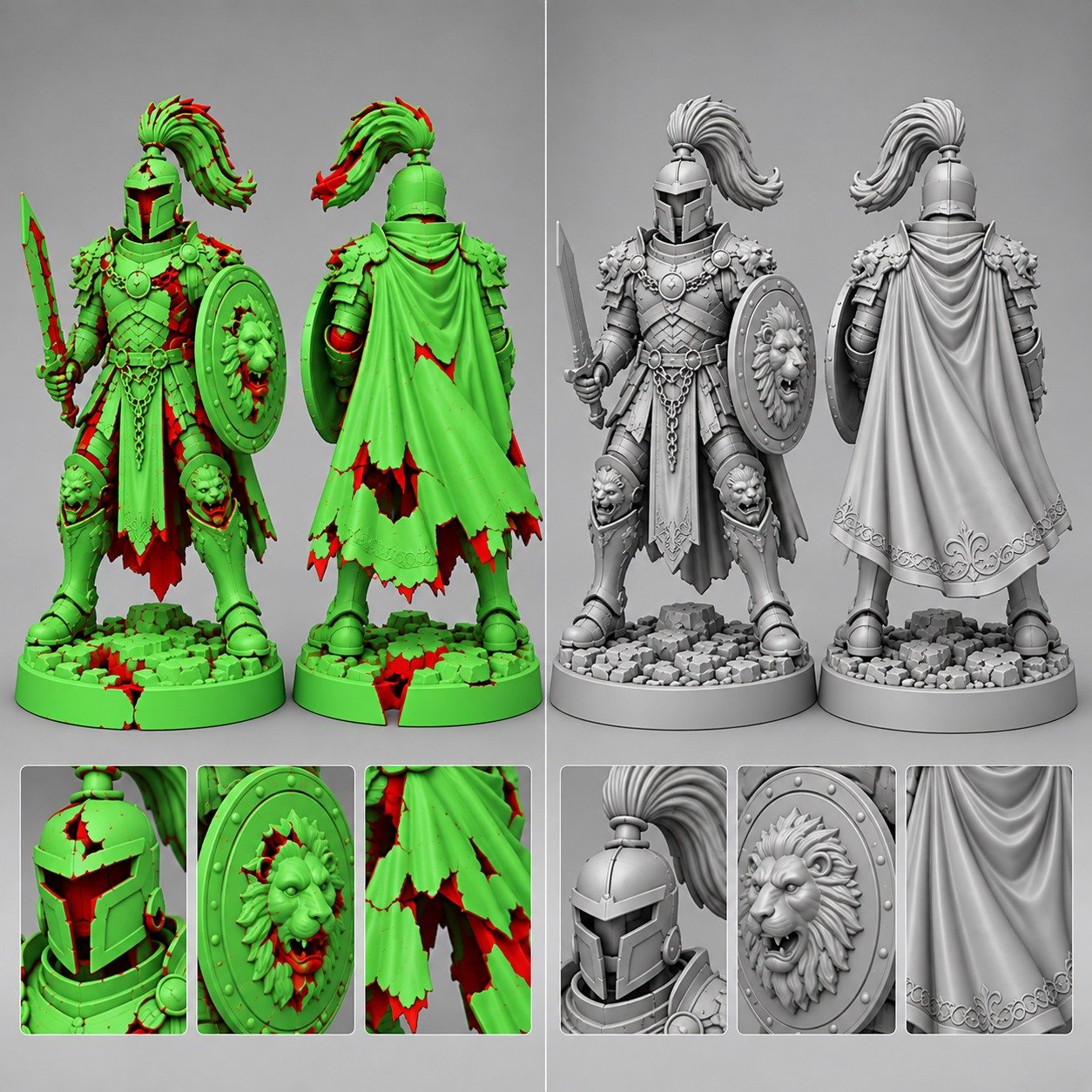
AI-generated 3D model being inspected, repaired, and converted into clean, print-ready CAD geometry for 3D printing and manufacturing.
Product Development
Case Studies
Project Breakdown

Challenge, Approach & Delivery Results

A structured review of the client's problem, engineering methodology, and verified manufacturing outcome.

Phase 01 • Challenge

The problem to solve

At first glance, the downloaded model appeared to be complete. However, once it was inspected more closely, the geometry contained several problems. Some areas of the model were not properly formed, while others contained unnecessary or inconsistent geometry. These issues made the file difficult to edit and created problems when preparing it for 3D printing. The client had already tried to work with the model but found that fixing the geometry manually was becoming increasingly difficult. The main challenge was therefore not creating the concept from scratch. The concept already existed. The challenge was turning an imperfect AI-generated mesh into a reliable engineering model.

Phase 02 • Approach

How the team moved forward

Rather than trying to patch individual errors one by one, Solidus evaluated which parts of the model could be repaired and which areas needed to be rebuilt. This distinction was important. Simple mesh defects can sometimes be repaired with automated or manual tools. But if the underlying geometry is poorly constructed, repeatedly repairing small errors can create more problems later. The model was therefore cleaned and reconstructed where necessary, while preserving the original design concept provided by the client.

The workflow included:

01

Geometry Inspection

The supplied model was examined for surface and mesh problems that could affect downstream manufacturing.

02

Cleaning the Model

Unnecessary geometry, duplicate elements and problematic surfaces were identified and removed or corrected where appropriate.

03

Rebuilding Problem Areas

Features that could not be reliably repaired were recreated using proper CAD geometry. This helped produce cleaner surfaces and more predictable dimensions.

04

Checking Wall Thickness

For a model intended for 3D printing, wall thickness is an important consideration. Thin or inconsistent sections can lead to printing problems depending on the selected technology and material. The model was reviewed with its intended manufacturing process in mind.

05

Checking Critical Features

Functional areas such as openings, mounting features, interfaces and other important dimensions were reviewed to ensure they behaved as intended.

06

Preparing the Final Model

Once the geometry was corrected, the model was prepared in a format suitable for the client's next stage of development and manufacturing.

Phase 03 • Result

What changed after delivery

The client was able to move forward with the original design idea without having to start the entire concept again. Solidus transformed the problematic AI-generated file into a cleaner and more practical model for the next stage of the project.

The corrected model could then be used for:

3D printing,

prototype development

design modifications

manufacturing discussions

further CAD development

production preparation.

Most importantly, the client no longer had to spend time trying to identify and repair complex geometry issues without knowing exactly what was causing them.

Project Overview

AI tools have made it much easier to create 3D concepts without traditional CAD experience. A user can describe an idea, generate a 3D model, download the file, and move toward prototyping within a short time.

But a model that looks correct on screen isn't necessarily ready for 3D printing or manufacturing.

Solidus 3D Modeling recently helped a client who had generated and downloaded a 3D model using an AI-based tool. The overall shape matched the client's idea, but when the model was prepared for production, several geometry issues became apparent.

The client needed help turning the concept into a clean, usable 3D model suitable for 3D printing and further manufacturing.

What We Found During the Model Review

Solidus first examined the supplied file to understand how the geometry had been created and where the problems were concentrated.

Depending on how an AI tool generates the model, the output may contain geometry that is visually acceptable but isn't structured like a conventional CAD model.

During the review, issues can include:

  • Non-manifold or open geometry
  • Intersecting surfaces
  • Gaps between surfaces
  • Duplicate or overlapping faces
  • Unwanted internal geometry
  • Irregular surface transitions
  • Excessively dense mesh areas
  • Incorrect wall thickness
  • Features that are difficult to edit
  • Geometry that creates problems during slicing

Not every issue is visible when simply rotating the model on screen. That is why the first step was to inspect the actual geometry rather than immediately sending the file to a 3D printer.

From AI Concept to Engineering Model

One of the key differences between the original file and the final Solidus model was how the geometry could be used.

The AI-generated file had been useful for communicating the client's idea, but it wasn't practical as a manufacturing asset.

After the reconstruction and cleanup, the client had a model that could be properly reviewed, modified and prepared for production.

This distinction is important:

AI helped create the starting concept. Solidus helped turn that concept into usable engineering geometry.

The two processes don't have to compete with each other. AI can be useful during the early concept stage, while experienced CAD modeling is still valuable when the design needs to become accurate, editable and manufacturable.

What This Project Demonstrates

AI-generated 3D models can be useful for rapid concept generation, but there can be a significant difference between a model that looks right and a model that is technically ready to manufacture.

For 3D printing and manufacturing, geometry needs to be checked for issues that may not be obvious from the model's appearance.

Solidus 3D Modeling provides the engineering and CAD expertise needed to inspect, repair, remodel and prepare such designs for real-world applications.

From AI-Generated Concept to Production-Ready Geometry

If you have generated a 3D model using AI but are facing problems with geometry, editing, slicing, 3D printing or manufacturing, you don't necessarily need to abandon the design.

Solidus can review the existing model, identify the underlying issues, and rebuild or refine the geometry where required.

Your AI-generated model can be the starting point. We can help make it usable.

Discussion

Reader comments

Ask follow-up questions, share what you are building, or continue the conversation around this resource.

0 Comments

Join the thread

Post a comment

Comments publish directly on the resource page, so keep the note specific and useful for other readers too.

Visible to future readers and your team.

No replies yet

Start the discussion

Be the first to ask a follow-up question or add practical insight about this topic.

Need 3D Help? Ask AI Assistant 👋
AI Assistant
AI Assistant