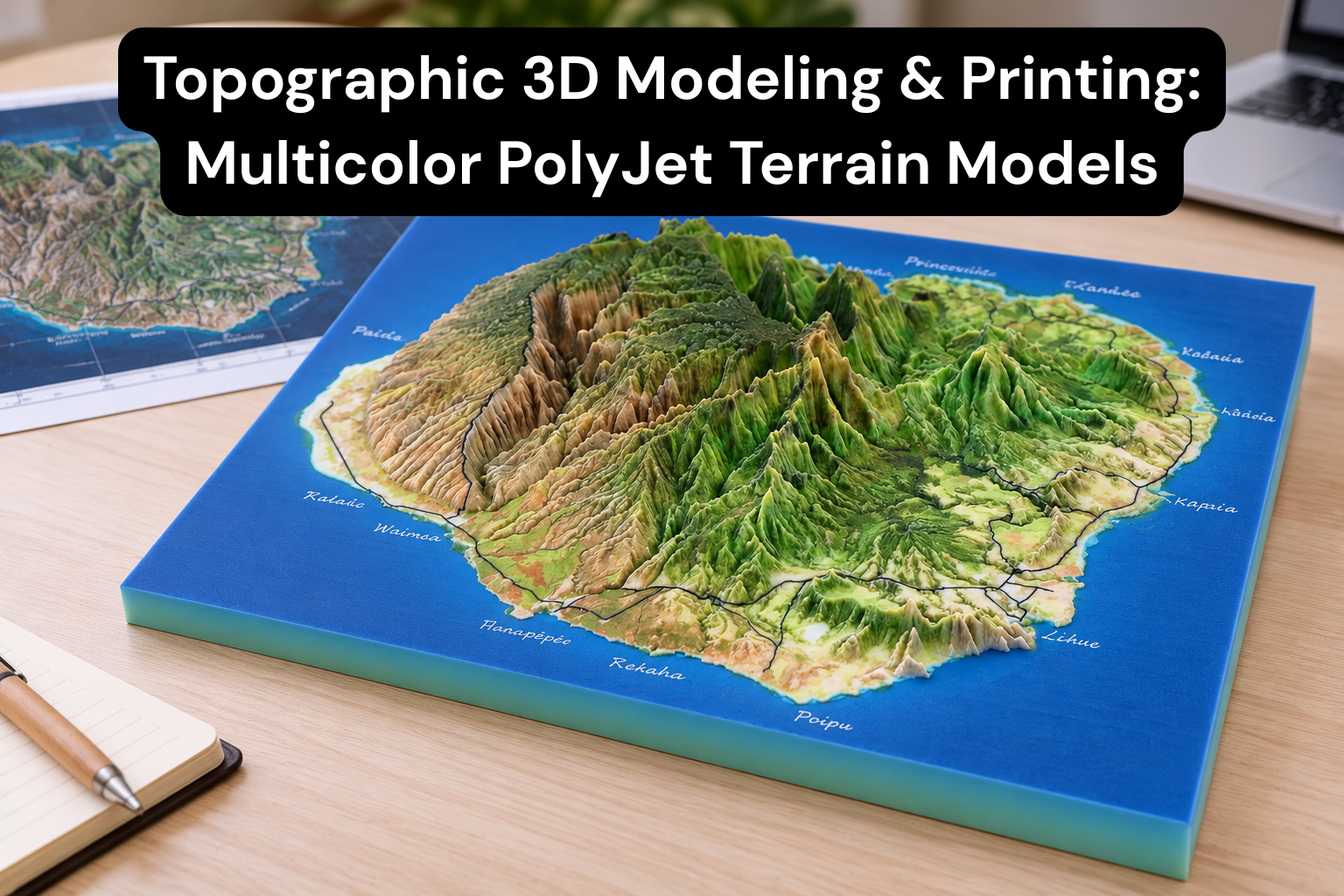
A flat map can tell you where a hill is. A physical terrain model lets you pick it up, turn it under the light, and see how the land rises, falls, and drains. That is why topographic 3D printing has become a popular way to present landscapes, development sites, and infrastructure projects.
This guide covers how a topographic 3D model works, how terrain data becomes a printable file, what to watch for during preparation, and why multicolor PolyJet 3D printing suits detailed terrain so well. It also covers common design challenges, real-world applications, and how to order a custom model.
1. What Is a Topographic 3D Model?
A topographic 3D model is a physical, scaled representation of a piece of land. It shows the shape of the terrain, including hills, valleys, ridges, slopes, riverbeds, and plains. Depending on the project, it can also include man-made features such as roads, buildings, bridges, and boundaries.
What topographic models represent
Every topographic model is built around elevation, meaning the height of the ground above a reference level, usually mean sea level. Beyond raw height, a good model communicates:
- Terrain form: mountains, slopes, cliffs, plateaus, and depressions
- Contours: lines of equal elevation, which can be physically expressed as stepped layers or smooth surfaces
- Hydrology: rivers, lakes, drainage paths, and coastlines
- Land cover and features: vegetation zones, roads, buildings, parcels, and infrastructure
2D contour maps vs. physical 3D models
A traditional contour map is a 2D drawing in which closely spaced lines indicate steep terrain and widely spaced lines indicate gentle terrain. It is precise and widely used, but reading it takes training. Most people can't instantly picture the landscape from a set of curved lines.
A physical 3D model removes that barrier. Anyone, from a client to a student to a council member, can see at a glance where the high ground is, how steep a slope is, and how a site sits within its surroundings.
| Feature | 2D Contour Map | 3D Printed Topographic Model |
|---|---|---|
| Elevation shown by | Lines and numbers | Actual physical height |
| Ease of understanding | Requires map-reading skills | Intuitive for everyone |
| Best for | Analysis, surveying, documentation | Presentations, planning, communication |
| Interaction | Visual only | Visual and tactile |
| Color-coded features | Limited | Full-color, feature-specific |
2. How Topographic Models Are Designed
Creating an accurate terrain model starts long before printing. The quality of the final print depends heavily on the quality of the source data and on how it is processed.
Common data sources
DEM (Digital Elevation Model) data. A DEM is a grid of elevation values covering a geographic area. It is the most common starting point for terrain modeling because it directly describes the shape of the ground. Resolution varies, from coarse regional datasets to high-resolution LiDAR-derived surveys.
GIS data. Geographic Information System files carry elevation plus layers of information such as roads, rivers, building footprints, land use, and property boundaries. These layers are what let a model show more than bare terrain.
Contour maps. Existing contour lines, whether from CAD drawings, survey plans, or digitized paper maps, can be converted into surfaces. The contours are interpolated into a continuous terrain, usually through a surface-generation process such as a TIN (Triangulated Irregular Network).
Satellite and geographic data. Satellite imagery and aerial photography help identify land cover and features, and can guide how colors are assigned to different areas of the model.
Converting terrain data into a printable 3D model
The typical workflow looks like this:
- Define the area of interest by boundary, coordinates, or site limits.
- Collect and verify the elevation data (DEM, GIS, contours, or survey points).
- Generate a terrain surface, a mesh or TIN representing the ground.
- Add feature layers such as water, roads, and buildings.
- Convert the surface into a solid, which means adding a base and sides so it becomes a watertight object.
- Assign colors or materials to terrain zones and features.
- Export a print-ready file and run final checks.
Scaling and vertical exaggeration
Two decisions shape how the model looks and reads: scale and vertical exaggeration.
Scale sets how real-world distances translate to the physical model. A 1:5,000 scale suits a site or neighborhood, while a 1:50,000 scale or smaller suits a regional landscape.
Vertical exaggeration stretches the height of the terrain relative to its horizontal size. This matters more than most people expect. On a model of a large area, true-to-scale elevation can look almost flat, because even tall mountains are small compared with the width of the region. Exaggerating the vertical axis, for example by 2x, 3x, or more, makes the relief readable. The trade-off is that slopes appear steeper than they are, so exaggerated models should always be labeled with the factor used.
3. Preparing the Model for 3D Printing
A terrain surface that looks fine on screen isn't automatically printable. Preparation turns the digital design into a reliable physical object.
Mesh cleanup
Terrain meshes derived from raw data often contain problems that must be fixed before printing:
- Holes or gaps in the surface
- Non-manifold edges (geometry that cannot exist as a solid)
- Overlapping or duplicate faces
- Inverted normals
- Extremely dense triangle counts that make files unwieldy
A clean, watertight mesh is essential. Simplifying (decimating) dense areas can reduce file size without visibly affecting the result, and smoothing noisy data can remove artifacts that do not represent real terrain.
Minimum wall and detail considerations
Every 3D printing process has limits on how thin or small a feature can be and still print reliably. At a given scale, features like narrow roads, thin walls on buildings, small poles, or slender bridges may fall below those limits. Designers handle this by:
- Thickening fine features slightly beyond true scale so they survive printing and handling
- Simplifying or merging tiny details that would not be visible anyway
- Raising small features to sit clearly above the terrain surface
Base design
A well-designed base improves both the look and the durability of the model. Common choices include:
- A flat, solid base with clean vertical sides that show the terrain cross-section
- A stepped or layered edge that highlights elevation changes
- Space for a title, scale bar, north arrow, or legend
- A lightweight or hollowed base for large models, to control weight and material use
Buildings, roads, rivers, and other features
Added features need careful treatment:
- Buildings can be shown as simple massing blocks or detailed forms, depending on scale. At small scales, simplified blocks often read better than detailed facades.
- Roads may be raised slightly or inset into the terrain, and widened to remain visible at small scales.
- Rivers and lakes can be recessed channels or flat surfaces and assigned a distinct color, often blue, to separate them from land.
- Vegetation, boundaries, and zones can be color-coded areas rather than physical geometry.
File formats: STL, OBJ, and 3MF
- STL is the most widely supported format, but it carries geometry only and no color.
- OBJ supports geometry plus color and texture information, which makes it well suited to multicolor printing.
- 3MF is a modern format that can carry geometry, colors, materials, and units in a single file.
For full-color terrain, OBJ or 3MF (or a textured format) is generally preferred over plain STL. Always confirm the preferred formats with your print provider before exporting.
4. Why Multicolor PolyJet 3D Printing Is Useful
What is PolyJet 3D printing?
PolyJet is a 3D printing technology that works somewhat like an inkjet printer, but in three dimensions. The printer jets tiny droplets of liquid photopolymer onto a build tray, and UV light cures each layer instantly. Because multiple materials can be jetted and blended in the same layer, PolyJet can produce parts in a wide range of colors from a single print.
Benefits for topographic models
Multiple colors in one print. Instead of painting a model by hand after printing, PolyJet can build color directly into the part. Water, vegetation, roads, buildings, elevation bands, and boundaries can each have their own color, all in one pass.
Fine detail. PolyJet prints very thin layers, which allows it to capture subtle terrain variation, small features, and crisp edges that are difficult with other processes.
Smooth surface finish. PolyJet parts come out with a smooth finish, so slopes and surfaces look continuous rather than visibly layered. This is a real advantage for terrain, where surface quality affects how natural the landscape looks.
Complex geographic features. Overhangs, steep escarpments, intricate coastlines, and branching river networks can be produced accurately, with support material removed after printing.
Clear communication through color. Color turns a model from a shape into information. A model can show:
- Blue for rivers, lakes, and sea
- Green shades for forests, farmland, and parks
- Brown or tan tones for bare ground or rock
- Gray for roads and paved areas
- White or neutral tones for buildings
- Highlight colors for a proposed development site or boundary
Color-coding makes the model readable to non-specialists, which is exactly what presentations and public consultations need.
5. Topographic Model Design Challenges
Terrain modeling involves trade-offs. Knowing the common challenges up front helps you plan a better model.
Very large areas
Large regions must be scaled down heavily to fit a printable size, which shrinks every feature along with them. Small roads and buildings may disappear or need exaggeration. Sometimes the best approach is to split a large area into tiles that fit together.
Small elevation changes
Flat or gently rolling terrain can look dull at true scale. Vertical exaggeration helps, but it must be chosen carefully so the model stays honest and useful.
Thin features
Narrow ridges, slender structures, and fine linear features can be fragile or fall below minimum printable thickness. These typically need to be thickened or simplified.
Data accuracy
A model is only as good as its source data. Outdated, low-resolution, or noisy elevation data produces a model that looks convincing but doesn't match reality. Checking data source, date, resolution, and coordinate system before modeling is good practice.
Scale selection
The right scale balances the size of the area, the level of detail needed, and the dimensions of the final model. Too small, and detail is lost. Too large, and the model becomes impractical to print, transport, or display.
Print size limitations
Every printer has a maximum build volume. Larger models are usually produced as multiple sections that are bonded together and finished so the joins are barely visible. Planning section boundaries early, ideally along natural features, produces a cleaner final result.
6. Applications of 3D Printed Topographic Models
Physical terrain models are used wherever people need to understand land quickly and communicate it clearly.
- Architecture: Show how a building or complex sits within its site, slope, and surroundings.
- Real estate development: Help buyers, investors, and partners see a project's context, access, and views.
- Urban planning: Support master plans, zoning discussions, and community presentations.
- Civil engineering: Visualize roads, drainage, embankments, and earthworks relative to the terrain.
- Land development: Evaluate grading, plot layouts, and site constraints.
- Mining: Represent pits, stockpiles, and surrounding terrain for planning and stakeholder communication.
- Education: Teach geography, geology, hydrology, and map reading with something students can touch.
- Geographic visualization: Present watersheds, mountain ranges, coastlines, and natural features.
- Presentations and exhibitions: Serve as an eye-catching centerpiece for showrooms, museums, visitor centers, and trade shows.
7. How to Order a Custom Topographic 3D Model
Ordering a custom model is straightforward when you have the key information ready. Here is what a provider will typically need.
What you need to provide
- Location or data: The exact area of interest, as coordinates, a boundary file, an address with a defined radius, or a marked-up map.
- Source data (if you have it): DEM files, GIS layers, CAD drawings, contour maps, survey data, or satellite imagery.
- Desired scale: A specific scale (such as 1:2,000) or, if unsure, the intended final size so the provider can recommend one.
- Model dimensions: Preferred length, width, and overall height, including any limits on transport or display space.
- Vertical exaggeration: True scale or a preferred factor.
- Color requirements: Which features should be highlighted and in what colors, such as water, roads, buildings, vegetation, or a development boundary.
- Features to include: Buildings, proposed structures, roads, bridges, labels, a legend, or a custom base.
- Expected application: Whether the model is for a presentation, exhibition, education, or engineering review. This affects detail level, durability, and finish.
Tips for a smooth process
- Share your deadline early so production can be planned.
- Provide the best-quality source data you have.
- Ask for a digital preview or approval stage before printing.
- If you do not have data, a good provider can often source suitable public elevation data for you.
8. Frequently Asked Questions (FAQ)
Can you create a 3D model from contour maps?
Yes. Contour maps, whether digital (CAD, GIS) or scanned from paper, can be converted into a 3D terrain surface by interpolating between the contour lines. Accuracy depends on the contour interval and the quality of the original map.
Can GIS/DEM data be converted into a printable model?
Yes. DEM and GIS data are among the best sources for topographic printing. The elevation grid becomes a 3D surface, which is then converted into a watertight solid, scaled, and prepared for printing.
How accurate can a topographic 3D print be?
Accuracy depends on two things: the source data resolution and the printing process. PolyJet is known for fine detail and tight tolerances, but the final model can only be as accurate as the elevation data and the scale chosen. Smaller scales also mean each millimeter of the model represents more real-world distance.
Can roads, buildings, and rivers be printed in different colors?
Yes. This is one of the biggest advantages of multicolor PolyJet printing. Each feature type can have its own color built directly into the print, with no manual painting needed.
What file formats do you accept?
Typically, STL, OBJ, and 3MF are accepted for 3D models, while GIS and CAD sources (such as DEM/GeoTIFF, shapefiles, DWG, or DXF) can be used as input for model creation. Confirm the exact list with your provider. (Edit this answer to match your company's actual accepted formats.)
What is PolyJet 3D printing?
PolyJet is a 3D printing technology that jets droplets of liquid photopolymer onto a build tray and cures them with UV light layer by layer. It can print in multiple colors and materials at once, with fine detail and a smooth surface finish.
How large can a topographic model be?
The size of a single printed piece is limited by the printer's build volume. Larger models are made by printing multiple sections and assembling them into one seamless display. (Insert your maximum single-piece and assembled dimensions here.)
Conclusion
Topographic 3D printing turns elevation data, contour lines, and GIS layers into something people can see, touch, and understand immediately. With multicolor PolyJet 3D printing, a terrain model can show fine landforms, a smooth surface, and color-coded rivers, roads, buildings, and land cover, all in a single print.
Whether you're presenting a development site, planning infrastructure, teaching geography, or building an exhibition centerpiece, a well-prepared physical model communicates what a flat map can't. If you have a location, a scale in mind, or just a map and an idea, the next step is to share your requirements and request a quote for your custom topographic 3D model.
Ready to turn your site data into a detailed physical model? Request a custom topographic 3D model quote here →https://solidus3dmodeling.com/

No replies yet
Start the discussion
Be the first to ask a follow-up question or add practical insight about this topic.